
File email on a contact with your BCC address
Add one private address to the Bcc of an email and it appears on the contact's page, from any mailbox.
- Who can do it
- Everyone on the team
- Plan
- All plans
- Time
- 5 minutes
Most of your conversations happen in your own inbox. With your private BCC address, any email you send, or forward, is saved on the contact's page so the whole team can see it. It works with any mailbox, and nothing in your mailbox is read.
Find your address
- Open Settings → Email → Email Connect.
- At the bottom, find Your BCC address and choose Copy.
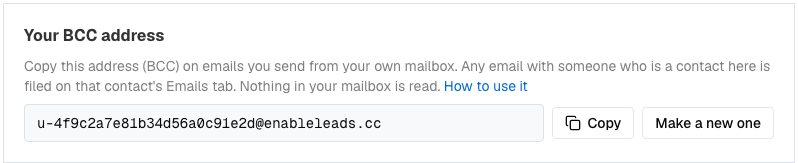
Your private BCC address, with Copy and Make a new one. - In your mail app, save it as a contact called "EnableLeads", so you can find it quickly.
If the card says it is not switched on yet, write to us.
File an email you send
- Write the email as usual. Put the contact in To.
- Put your BCC address in Bcc, not in To or Cc.
- Send it.
- About a minute later, open the contact, choose the Emails tab and choose Load emails. Your email is there.
An email to several contacts is filed on each of them. It is filed only when someone on it is a contact in your business, matched by email address; otherwise it is dropped quietly.
File an email a client sent you
Forward the client's message, on its own, to your BCC address. Leave To and Cc empty apart from that address, and keep the forwarded text in the body of the message, not as an attachment. It is filed as a reply from that client.
Replies get noticed
When an email from a contact is filed, whoever has that lead gets an alert in the bell, unless they filed it themselves. To switch it off for yourself, open Settings → Users Details → Manage Profile, untick When a contact replies by email under Notify me, and choose Save.
What is kept
The text of the email. Attachments and images are not kept, very long messages are shortened, and the same email is never filed twice on a contact.
If it does not work
- Nothing appears. Check that the contact has exactly the email address you sent to, that you used Bcc, and that you copied the address exactly. Then wait a minute and choose Load emails again.
- I used the wrong field. An address in To or Cc is not the same as Bcc. Send again with it in Bcc.
- It worked and then stopped. You may have chosen Make a new one. Copy the new address.
- An email to myself is not filed. Emails to your own address are ignored.
- Still stuck. Send a request from Help & support with the contact's name and the time you sent it.
What to do next
Was this helpful?
Still stuck?
Ask us and tell us what you were trying to do. We will see the page you came from.
Ask us in EnableLeadsRelated
Last updated 2 November 2026