
Download your data, leave or close your account
Take your contacts with you, leave a business you belong to, close the account, or ask us to delete personal data.
- Who can do it
- Owner to close the account; anyone for the rest
- Plan
- All plans
- Time
- 5 minutes
Your data is yours. You can take it, leave, or ask us to delete it.
Download your data
Open Settings → Workspace and choose Download your data or close this account. Under Take your data with you, download a CSV of your Contacts, Deals, Tasks, Notes or Calls. Contacts can also be downloaded from Plan & Billing, even if your plan has ended.
Close the account
Only the owner can close a business.
- Open Settings → Workspace and choose Download your data or close this account.
- Download your data first, if you want it.
- Under Close the account, choose Why are you leaving?, type the workspace name to confirm, and type your password.
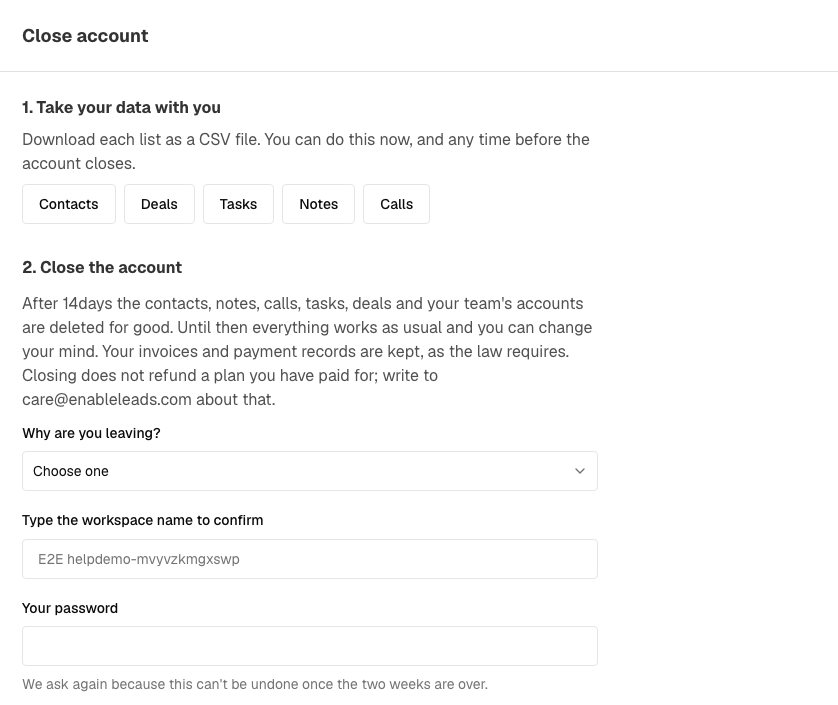
Download your data first, then close the account. - Choose Close my account.
Nothing is deleted at once. Your business works as normal for 14 days, and we email a reminder 3 days before. At the end, the contacts, notes, calls, tasks, deals and everyone's accounts in it are deleted for good. We keep invoices and payment records, because the law requires it. Until the date, Keep my account cancels the closing. There is no refund; write to care@enableleads.com with any question.
Leave a business you belong to
If you work in more than one business, you can leave one without closing it.
- Open Settings → Users Details → Your Businesses.
- Choose Leave on that business, then Yes, leave.
Your contacts and tasks there go to the owner, and you are taken to your other business. An owner cannot leave: transfer ownership first, or close the account. If it is your only business, ask the owner to remove you.
Ask us to delete or correct personal data
If you are a person whose details were collected by a business that uses EnableLeads, or you want a copy of your data, use the public request form at app.enableleads.com/data-deletion (also linked from the sign-in page). Choose Delete my data, Send me a copy of my data or Correct my data, add your name and email, and send it. We complete it within 30 days and email you a confirmation. You can also write to care@enableleads.com with the subject "Data deletion request".
If it does not work
- I cannot find the close option. Only the owner sees it. Ask the owner, or ask them to transfer ownership to you.
- "Type the workspace name exactly to confirm." Copy the name exactly as it appears at the top of the page.
- I closed it by mistake. Open the same page and choose Keep my account before the closing date.
What to do next
Was this helpful?
Still stuck?
Ask us and tell us what you were trying to do. We will see the page you came from.
Ask us in EnableLeadsRelated
Last updated 2 November 2026