
Plans, trial and invoices
See where your trial or plan stands, add people, request an invoice and keep your business running.
- Who can do it
- Owner or Admin
- Plan
- All plans
- Time
- 5 minutes
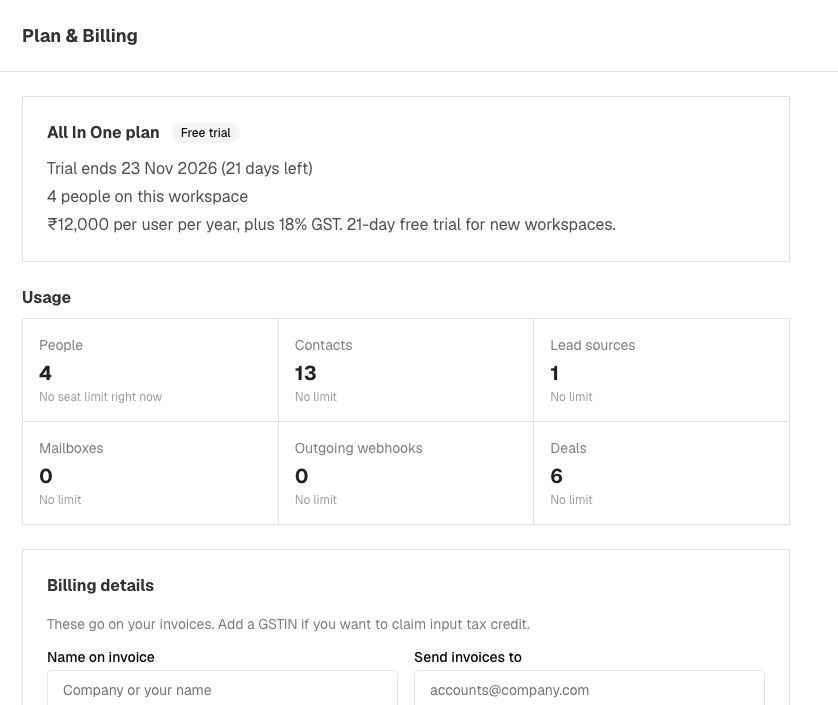
Everything about your plan is on one page: Settings → Users Details → Plan & Billing. Only admins can open it.
See where you stand
At the top, a label shows your state: Free trial, Active, Complimentary, Ending or Expired, with the date your trial ends or your plan renews. During the trial, and in the last 30 days of a paid year, a banner at the top of every page counts the days and offers Choose a plan or Renew to admins. Below, usage tiles show how much of your plan (people, contacts and so on) is in use. They say Nearly full or Limit reached as you get close.
Add your billing details
Before you can ask for an invoice, open Billing details and fill in Name on invoice, Send invoices to, an optional GSTIN, State and Address, then choose Save details. These go on your tax invoice, and a GSTIN must match its state.
Choose a plan and ask for an invoice
- Under Choose your plan, set the number of Seats. A seat is one person who signs in; you cannot choose fewer than the people already in your business.
- Check the quote: subtotal, GST and total.
- Choose Request invoice. We email you the bank-transfer details, and the request shows as awaiting payment, with View invoice and Cancel request buttons. You can have one pending request at a time and up to five a day.
- Pay by bank transfer. When the payment reaches us, your plan is activated for a year and your tax invoice is issued.
Online payment is not switched on yet. During a paid year, Add seats raises the number of people, charged for the rest of the year. To renew, use Renew for another year.
Find your invoices
The Invoices table lists each one with its date, amount and status (Awaiting payment, Paid or Cancelled). Open an invoice and print it, or save it as a PDF from your browser's print screen.
If your trial or plan ends
Your business is locked, so only Plan & Billing, your profile and Help & support stay open. Your contacts are safe, new leads keep arriving, and Download contacts (CSV) on that page still works. Choose a plan to get everything back. If you need more time, write to us.
To cancel
Email care@enableleads.com. Your plan stays active until the end of the paid year.
If it does not work
- "Save your billing details first." Fill in Billing details and save, then request the invoice.
- "Your plan has N seats and all are in use." Add seats on this page first.
- "Your plan allows N … and all are in use." A plan limit (contacts, lead sources and so on). Write to us to raise it.
- I cannot open Plan & Billing. Only people whose role can manage billing see it. Ask an admin.
What to do next
Was this helpful?
Still stuck?
Ask us and tell us what you were trying to do. We will see the page you came from.
Ask us in EnableLeadsRelated
Last updated 2 November 2026