
Your first hour with EnableLeads
Five steps that take a new business from an empty account to a team working real leads.
- Who can do it
- Owner or Admin
- Plan
- All plans
- Time
- About an hour
When you create a business, the Tasks page shows a Get started card with five steps. Each step ticks itself the moment it is true, so you can do them in any order and come back later. This page walks through them and says what "done" looks like.
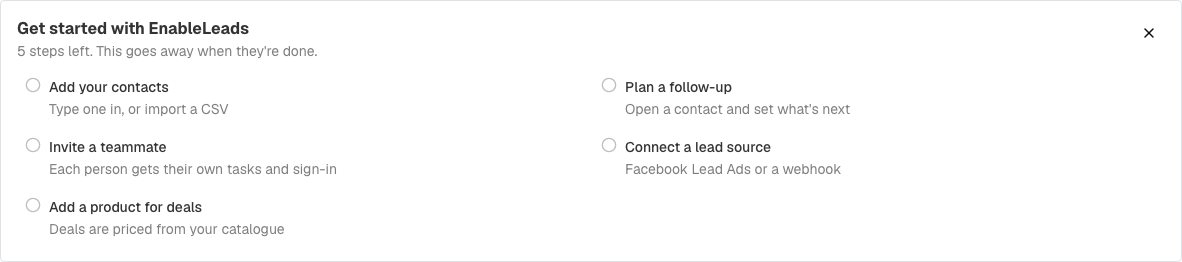
1. Add your contacts
Start with the people you already talk to. You can type one in or bring a whole list.
- Open Contacts.
- To add one person, choose Add Contact, fill in a name and a phone number or email, and submit. See add your first contact.
- To bring a list, choose Import Contacts and pick your CSV file (the full guide). We guess which column is which from the column names; check the matches, change any that are wrong, then import.
2. Plan a follow-up
A lead without a next step is a lead that gets forgotten. Open any contact and write what happens next in the What's Next? box, then pick who does it and when. Leads that arrive from a web form, Facebook or a webhook can get a first task automatically, so someone acts right away. See your daily task list.
3. Invite a teammate
Each person gets their own sign-in, their own tasks and their share of new leads. See how to invite your team.
4. Connect a lead source
This is where new leads come from without anyone typing them in. The quickest one is a web form you can share as a link or paste into your website: capture leads with a web form. For Facebook ads, see get Facebook leads; webhooks are under Settings → Apps and Integrations.
5. Add a product for deals
Deals are priced from your catalogue. Open Settings → Deals Catalog → Deal Items and add what you sell, with its price. You can skip this until you start tracking deals.
If it does not work
- I do not see the Get started card. It is shown to the admin of a new business for the first 30 days. Ask an admin of your business, or look for the same steps in Settings.
- A step is not ticking. Reload the page. The card looks at what your business has right now, so it ticks as soon as the thing exists (for example, once a second person has been added to your team).
What to do next
- Invite your teamAdd a teammate, choose what they can do, and decide whether they get new leads.
- Capture leads with a web formBuild a form, share its link or paste it into your website, and every answer becomes a contact with a task.
- Your daily task list and "What's Next?See what to do today, finish a task, and always leave the lead with a next step.
Was this helpful?
Still stuck?
Ask us and tell us what you were trying to do. We will see the page you came from.
Ask us in EnableLeadsLast updated 2 November 2026